



Disclaimer: Internet Hunters is not affiliated with any internet provider mentioned in this article. Our information is independent, unbiased and research-based, but prices and availability change, so confirm details with the provider before signing up.
Every internet ad leads with a speed number. The thing that matters more is in the fine print: the type of connection behind it.
Fiber, cable, 5G, satellite, fixed wireless and DSL all get you online, but they reach your home in completely different ways. That decides how fast your uploads are, whether things slow down at 8 p.m., how much lag you feel on a video call, and whether you can get it at your address at all.
This guide walks through each type and address: what it's good at, where it falls short, and who it actually suits.
Moving, renting or new to the US? There's a section for you on what to check before you sign anything.
The Short Answer
- Fiber is the best connection you can get, and it's more available than most people think. If it's at your address, start there.
- Cable is the common default: fast downloads, slower uploads, and prices that tend to climb after the promo ends.
- 5G home internet is a real alternative now, with no installer and simple pricing. The catch: your traffic waits behind phone traffic when the tower is busy.
- Satellite has split in two. Low-orbit service handles video calls fine; older geostationary satellite is still laggy.
- Fixed wireless from a local provider is often the best bet at rural addresses without cable or fiber.
- DSL is the fallback. Most DSL plans don't meet today's federal broadband benchmark.
Whatever you pick, check your exact address, not your ZIP code. What's available can change from one building to the next.
| Type | How it reaches you | Typical download | Upload | Lag (latency) | Best for | Watch out for |
|---|---|---|---|---|---|---|
| Fiber | Glass cable to your home | 300 Mbps–1 Gbps most common; multi-gig in some areas | Usually matches download | Very low | Remote work, big households, gaming, heavy uploads | Not at every address; may need a technician install |
| Cable | TV coaxial line | 300 Mbps–1 Gbps; top plans 2 Gbps | Usually a fraction of download | Low | Most homes without fiber | Evening slowdowns in busy areas; promo prices expire |
| 5G home internet | Cell signal to an indoor gateway | Low hundreds of Mbps; some plans up to 1 Gbps | Roughly 10–55 Mbps | Low to moderate | Renters, quick setup, no installer | Slows first when the tower is busy; needs strong signal in your unit |
| Low-orbit satellite (Starlink) | Dish to satellites about 340 miles up | Roughly 45–280 Mbps | Roughly 10–30 Mbps | 25–60 ms | Rural homes with no wired option | Needs open sky; higher equipment and monthly costs |
| Geostationary satellite (Hughesnet, Viasat) | Dish to satellites about 22,000 miles up | Up to 100–150 Mbps | Low | 600+ ms | Last resort | Heavy lag; data limits; high prices |
| Fixed wireless (local provider) | Outdoor antenna to a nearby tower | Roughly 25–100 Mbps | Low | Low to moderate | Rural and edge-of-town addresses | Needs line of sight; some plans cap data |
| DSL | Copper phone line | Up to about 100 Mbps often far less | Often under 10 Mbps | Low to moderate | Light use where nothing else reaches | Slower the farther you are from the provider being phased out |
Ranges compiled from provider specs and independent measurements; see Sources at the end.
What Counts As "Broadband"
The FCC defines broadband as at least 100 Mbps download and 20 Mbps upload, a benchmark it adopted in March 2024. Below that, a household that streams, works from home and video calls at the same time will likely feel it.
The benchmark is a handy filter. Most DSL plans fall short of it. Some wireless and satellite plans clear the download number but miss on upload: Ookla measured Starlink's US median upload at around 14–15 Mbps in early 2025.
Fiber
Fiber is the fastest, most consistent home internet you can buy, and it now passes more than 60% of US households.
How It Works?
Data travels as pulses of light through thin glass strands. Light doesn't pick up electrical interference, so performance stays steady over distance and through the evening rush.
What to Expect?
Most fiber plans run from 300 Mbps to 1 Gbps, with multi-gig tiers in some areas. The real standout is upload: on most fiber plans it matches download. That matters if you back up photos, send big files or live on video calls.
Where It Falls Short?
Coverage is patchy at street level. One building can have fiber while the one next door doesn't. If your unit isn't wired yet, install may mean a technician and some drilling, so clear it with your landlord first.
Good fit if: fiber reaches your address. Pricing is usually in line with cable, so there's rarely a reason to pass on it.
Myth: "Fiber is only in big cities."
Reality: With more than 60% of households now passed by fiber, it's no longer a big-city perk. Check before you assume.
Go deeper:
Fiber Internet: How It Works, Real Speeds and What It Costs
Fiber vs Cable Internet: Which One Should You Choose
Cable
Cable is the most common home internet connection in the US and the practical choice for most households that can't get fiber.
How it Works?
Cable internet uses the same coaxial line as cable TV. Most cable companies run fiber deep into their networks and use coax for the last stretch to your door.
What to Expect?
Download speeds commonly run 300 Mbps to 1 Gbps, and top plans reach 2 Gbps. Upload is the weak spot: on most cable plans it's a small fraction of download. That's starting to change. Comcast's DOCSIS 4.0 upgrade offers matching upload and download tiers up to 2 Gbps where it has rolled out.
Where It Falls Short?
You share capacity with your neighborhood, so speeds can dip at busy evening hours. Pricing is the bigger trap: cable bills often jump when a 12- or 24-month promo ends. Check the regular rate before you sign.
Good fit if: you mostly download (streaming, browsing, gaming) and fiber isn't available.
Myth: "Cable always crawls at night."
Reality: The FCC measures speeds during evening peak hours, and it found most large providers delivered close to or above their advertised speeds. Slowdowns happen, but they depend on your local network.
Go deeper:
Cable Internet Explained: Shared Bandwidth and Real-World Performance
5G and 4G LTE home internet
5G home internet is the easiest setup on this list: a gateway you plug in yourself, no technician. For renters and frequent movers, that alone can make it the winner.
How It Works?
A gateway in your home connects to the same cellular network your phone uses and turns it into Wi-Fi. The big national options are T-Mobile, Verizon and AT&T.
What to Expect?
Typical speeds land in the low hundreds of Mbps, and some plans advertise up to 1 Gbps. Uploads are modest, usually in the tens of Mbps. Some plans now cap speed outright: T-Mobile's entry Rely plan tops out at 354 Mbps for new customers.
Where It Falls Short?
You share the tower with everyone's phones, and most phone customers come first. T-Mobile's policy puts home internet in a lower priority tier and warns that lower-priority users can see significant slowdowns when the network is heavily loaded. The same policy notes most of the time the network isn't that busy. Signal inside your unit matters too: thick walls or an interior room can cut speeds sharply.
4G LTE home internet works the same way on older networks, typically in the tens of Mbps. Treat it as a fallback where 5G doesn't reach.
Good fit if: you rent or move often, want simple pricing, and get a strong signal where the gateway will sit.
Myth: "5G home internet is just like having a wired line."
Reality: It's a shared radio connection. It can be great on a quiet tower and noticeably slower on a busy one.
Before you commit, ask about the trial or return window and run speed tests in the room you'll actually use.
Satellite
Satellite reaches almost anywhere with a clear view of the sky, but the two kinds of satellite internet now behave very differently.
Low-Orbit Satellite (Starlink)
The satellites fly about 340 miles up, so signals make a short trip. Starlink says typical downloads run 45–280 Mbps with 25–60 ms latency on land, and calls it suitable for video calls and online gaming. Independent Ookla data put its US median download at about 104 Mbps in early 2025. Uploads are the weak spot.
Geostationary Satellite (Hughesnet, Viasat)
These satellites sit about 22,000 miles up. The long round trip adds 600 ms or more of lag, which makes video calls and gaming frustrating. Current plans top out around 100–150 Mbps.
Where Both Fall Short
Heavy rain or snow can interrupt the signal, and trees or roofs can block the dish. Equipment and monthly prices usually run higher than wired options.
Renting?
FCC rules protect tenants' right to install certain small dishes and antennas in areas only they use, like a balcony or patio. They don't cover the roof or shared walls, which are the landlord's call.
Good fit if: you're rural with no fiber, cable or strong cell signal. Pick low-orbit over geostationary wherever you can.
Myth: "Satellite is always too laggy for Zoom."
Reality: That's true of geostationary satellite. Low-orbit service is a different experience.
Go deeper: Satellite Internet: Latency, Weather and Who It Actually Suits
Fixed Wireless
Fixed wireless from a local provider is often the best option at rural or edge-of-town addresses that cable and fiber never reached.
How It Works?
An antenna on your roof or wall points at the provider's tower, usually a few miles away. 5G home internet is technically a type of fixed wireless too, but traditional fixed wireless usually comes from smaller regional providers running their own towers rather than a phone network.
What to Expect?
Plans typically run roughly 25–100 Mbps, sometimes more. Lag is far lower than geostationary satellite. Performance depends on distance and line of sight: hills, trees and buildings between you and the tower all count.
Where It Falls Short?
Coverage is local and uneven, and some plans cap monthly data. Ask about caps and overage charges before you sign.
Good fit if: you're rural, have a clear line to a tower, and want a lower-lag alternative to satellite.
Go deeper: Fixed Wireless Internet: A Practical Guide for Rural Addresses
DSL
DSL is now the connection of last resort for most households: slow, sensitive to distance, and gradually being replaced by fiber.
How It Works
DSL runs over copper telephone lines. The farther you live from the provider's equipment, the weaker and slower the signal gets.
What to Expect?
The best DSL plans reach around 100 Mbps, but many addresses get far less, and uploads are often under 10 Mbps. DSL also tends to underdeliver: the FCC found DSL providers' "up to" speeds exceed what subscribers actually get on average (source).
Where It Falls Short?
Most DSL plans don't meet the FCC's 100/20 broadband benchmark. In many areas, phone companies are retiring copper lines and replacing them with fiber.
Good fit if: you only browse, email and stream one show at a time, and nothing faster reaches your address.
Myth: "DSL is always the cheapest option."
Reality: DSL is often priced close to much faster cable or 5G plans. Compare what you get per dollar before defaulting to it.
Already on DSL? Check your address again. Fiber, 5G or fixed wireless may have arrived since you signed up.
What kind of internet do I have right now?
Look at where your modem or router connects to the wall. That usually tells you in five seconds.
| What you see | Connection type |
|---|---|
| A round, screw-on cable outlet (coaxial) | Cable |
| A small phone jack | DSL |
| A thin cable into a small box on the wall (called an ONT), then an Ethernet cable to your router | Fiber |
| A gateway near a window with only a power cord | 5G or 4G LTE home internet |
| An antenna on the roof or wall aimed at a distant tower | Fixed wireless |
| A dish with a clear view of the sky | Satellite |
Some fiber setups run over coax inside the home, so if you're unsure, check your bill or your provider account. The same trick works on an apartment tour: the outlets on the wall show which connection types the unit is already wired for.
Moving or renting? Check these before you pick
Your address decides your options more than anything else, so do this homework before you commit.
- Check your exact address, not your ZIP code. Coverage changes street by street and even unit by unit. Start with the FCC National Broadband Map, then confirm on providers' own sites.
- Ask the landlord or building manager which providers are wired in. Some buildings have one provider pre-installed. Some include internet in rent or building fees, so ask before you pay for a second service.
- Look at the wall outlets when you tour. They show which connection types the unit already supports (see the table above).
- Book installation as soon as you have a move-in date. If a technician visit is needed, early booking keeps you from being offline in week one.
- Considering 5G? Test the signal in the unit itself. Upper floors and rooms with windows help. Basements and interior rooms hurt.
- New to the US? Some providers run a credit check at sign-up. If you don't have US credit history yet, ask about deposits, prepaid plans or providers that skip the check.
- Read the broadband label. Providers must show a label at the point of sale covering monthly price, introductory rates, data allowances and speeds. It's the fastest honest comparison you'll get.
Advertised speed vs what you actually get
On most wired connections, you'll get close to what you pay for. The FCC's long-running measurement program found most providers' measured speeds were close to or above advertised, with DSL the main exception.
When your internet feels slower than your plan, the culprit is often inside your home: an old router, weak Wi-Fi in the back bedroom, or a dozen devices at once. To check, run a speed test on a laptop plugged into the router with an Ethernet cable. If that result is close to your plan speed, the problem is your Wi-Fi, not your provider.
Wireless connections are different. 5G, fixed wireless and satellite speeds move with signal, weather and how busy the network is. For those, the typical speed on the broadband label is a better guide than the headline "up to" number.
How to Choose?
Start with what reaches your exact address, then match it to how you use the internet.
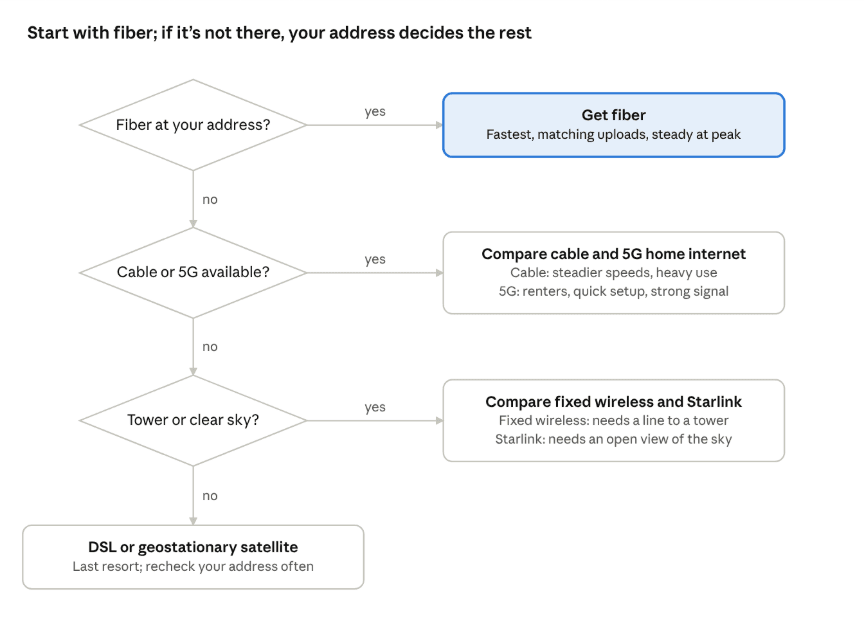
choosing a connection type · 3 questions, 4 outcomes
If two options are close, let upload speed and the regular price after any promo break the tie.
Frequently Asked Questions
What's the fastest type of internet connection?
Fiber. It offers the highest speeds available to homes, and on most plans uploads match downloads.
What's the most common type of home internet?
Cable. Fiber is catching up quickly and now passes more than 60% of US households.
Is 5G home internet as good as cable?
Where signal is strong, it can match cable on download speed. It's less consistent, though: home internet traffic gets lower priority when the tower is busy, and uploads are usually slower.
Is Starlink good for gaming and video calls?
Generally, yes. Starlink lists latency of 25–60 ms on land, far below older satellite service. Uploads are modest, so heavy uploaders may notice.
What's the difference between fixed wireless and 5G home internet?
Both are wireless connections to a fixed home. 5G home internet uses a mobile carrier's network and an indoor gateway. Traditional fixed wireless usually uses a local provider's tower and an outdoor antenna.
What speed do I need to work from home?
Upload matters as much as download. The FCC's 100/20 Mbps broadband benchmark is a sensible floor for a household where someone is on video calls.
How do I find out which types are available at my address?
Enter your full address on the FCC National Broadband Map, then confirm with the providers it lists. Ask your landlord what the building is already wired for.


